For iPhone, iPhone Duo and Apple Watch
Strength training that opens up.
BarbellFit plans your week, logs every set and tracks what you eat. On iPhone Duo it runs on the cover screen, then spreads into two columns when you unfold.
- 1,324
- movements in the library
- 5
- tabs: Today, Explore, Nutrition, Progress, Coach
- 2
- screens on Duo, one app
Folded
The whole app on the cover.
Closed, Duo is about the size of a passport. BarbellFit fits every tab on the cover screen, so you can check today's session without opening anything.
Opening
It opens like a book.
Part-way through the fold, the cover screen goes dark and the inner screen wakes up.
Unfolded
Two columns. Nothing in the way.
The muscle map and filters stay on the left while the movement list scrolls on the right. Tabs and screen buttons move into Duo's vertical bar beside the clock.
Train
The set you're on comes first.
Weight, reps and one yellow button. Complete the set and the rest timer starts on its own, then follows you to the lock screen and Dynamic Island.
- Warm-up and working sets logged separately
- How-to for every move, one tap away
- Hide the workout and it keeps running
Eat
Scan it or type it.
Point the camera at a barcode, a label or the plate. You review the portion before anything is saved, and the day's calories and macros update as you log.
- A sample day sized to your calorie target
- Mixed, vegetarian or plant-based
- Label reading happens on your iPhone
Progress
See your work add up.
Training days, sets and volume for the week, taken from what you logged. Weight and waist check-ins sit next to your starting point and your goal.
- Charts use recorded values only
- No trend line until there is data for one
Coach
Advice from your own numbers.
Insights are worked out on your iPhone from your logs. Want written answers? Turn on the AI coach. It is off until you say so, and it lists exactly what gets sent.
- Works offline with basic insights
- Your questions and photos are not stored
Setup
Gym equipment is the controls.
Set your height on a wall chart, your weight on a scale ruler and your age on a dial. While your plan is built, a barbell loads a plate for each stage that finishes.
Devices
One plan on every screen.
BarbellFit runs on iPhone, iPhone Duo and Apple Watch. Start a workout on your phone and your wrist follows along.
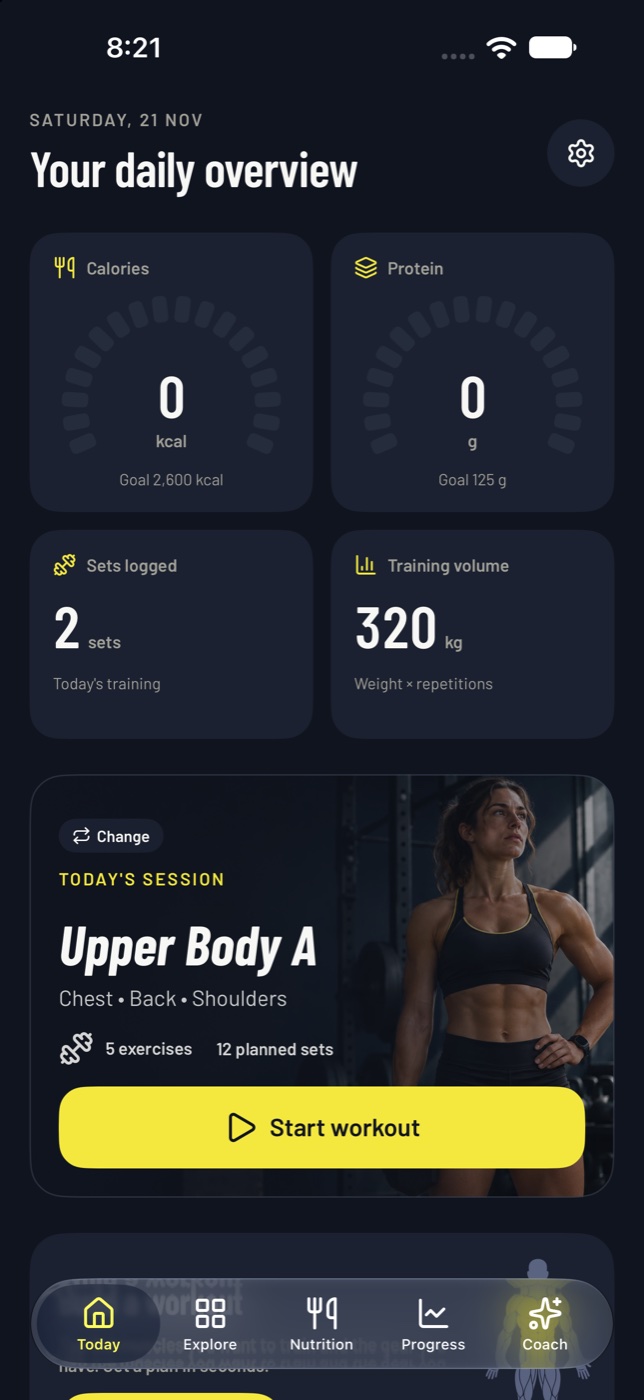
iPhone
All five tabs, with the rest timer on the lock screen and in the Dynamic Island. iOS 17 or later.
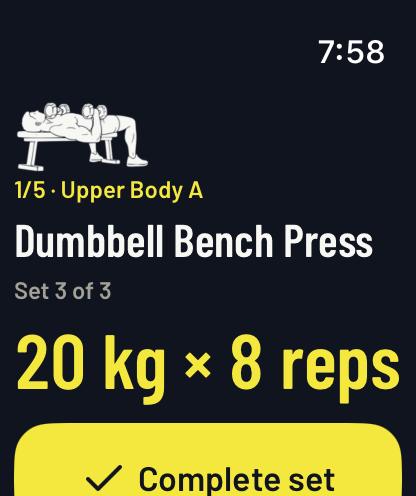
Apple Watch
The current move, one tap to complete the set, and the rest timer. watchOS 10 or later.
Privacy
Your training log stays on your iPhone.
No account is needed. Nothing leaves your device unless you scan a barcode, turn on the AI coach or choose to back up.
Read the Privacy PolicyTry it
Set the fold angle.
Drag the ruler to move the hinge, or drag the device to turn it around.